

Comprehensive Guide to MonsterInsights: The Ultimate Google Analytics Plugin for WordPress
- December 14, 2025
- Other Plugins
In the ever-evolving world of digital marketing, data-driven decision-making is crucial for success. Website owners, marketers, and businesses rely heavily on analytics to understand visitor behavior, optimize content, and improve conversions. One of the most effective tools available for WordPress users is MonsterInsights—a powerful plugin that seamlessly integrates Google Analytics with WordPress.
This article provides a comprehensive overview of MonsterInsights, exploring its features, benefits, installation process, and how it enhances website analytics without requiring coding expertise. Whether you're a blogger, e-commerce store owner, or digital agency, MonsterInsights is a game-changer that simplifies analytics and maximizes website performance.
What is MonsterInsights?
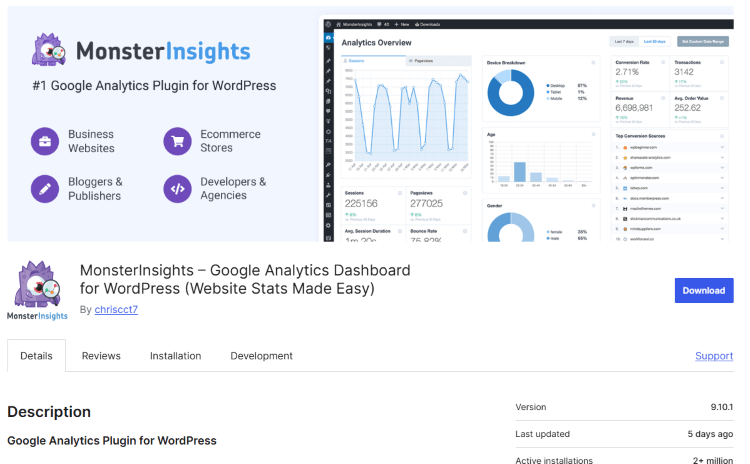
MonsterInsights is the most popular Google Analytics plugin for WordPress, enabling users to track website performance effortlessly. Instead of manually adding tracking codes and navigating through complex Google Analytics reports, MonsterInsights simplifies the process with an intuitive dashboard, delivering actionable insights directly within WordPress.
Originally developed by Yoast and later acquired by Syed Balkhi, founder of WPBeginner, MonsterInsights has evolved into a robust analytics solution trusted by over 3 million websites worldwide.
Key Features of MonsterInsights
1. Easy Google Analytics Integration
Setting up Google Analytics can be intimidating for beginners. MonsterInsights eliminates this challenge by providing a code-free installation process. With just a few clicks, users can connect their WordPress site to Google Analytics without modifying any website files.
2. User-Friendly Dashboard
MonsterInsights provides an interactive dashboard within WordPress, displaying important website metrics without requiring users to log into Google Analytics. Key data points include:
- Traffic Overview – Page views, sessions, bounce rate, and visitor demographics.
- Top Performing Content – Identify high-traffic pages and posts.
- Referral Sources – Understand where your visitors are coming from (search engines, social media, direct traffic, etc.).
- Real-Time Analytics – Track user activity on your site as it happens.
3. Enhanced eCommerce Tracking
For online store owners using WooCommerce, Easy Digital Downloads (EDD), or other eCommerce platforms, MonsterInsights provides enhanced eCommerce tracking. It helps analyze:
- Conversion rates
- Revenue performance
- Best-selling products
- Shopping behavior (cart abandonment rates, checkout performance)
4. Affiliate Link and Ads Tracking
Affiliate marketers and advertisers benefit from automatic tracking of outbound links, banner clicks, and ad performance. MonsterInsights integrates with popular affiliate management plugins like ThirstyAffiliates and Pretty Links, ensuring detailed insights into revenue-generating links.
5. SEO & Content Optimization Insights
Content creators can leverage MonsterInsights’ content analytics to improve search engine rankings and user engagement. Features include:
- Scroll Depth Tracking – Understand how far visitors scroll down blog posts and pages.
- Popular Posts Widget – Display trending articles to boost engagement.
- SEO Score Tracking – Integrates with plugins like Yoast SEO to enhance on-page SEO performance.
6. Form Conversion Tracking
MonsterInsights enables form tracking for popular WordPress form builders like WPForms, Gravity Forms, and Contact Form 7. This helps measure form submissions and identify conversion bottlenecks.
7. GDPR and Privacy Compliance
With increasing concerns about data privacy, MonsterInsights provides tools to ensure GDPR, CCPA, and other privacy law compliance. The plugin allows users to anonymize IP addresses, disable tracking for specific visitors, and integrate cookie consent solutions.
Why Choose MonsterInsights Over Manual Google Analytics Setup?
Many website owners wonder why they should use MonsterInsights instead of manually adding Google Analytics tracking code. Here’s how MonsterInsights makes a difference:
| Feature | MonsterInsights | Manual Setup |
| Easy setup (no coding required) | ✅ | ❌ |
| Real-time analytics in WordPress | ✅ | ❌ |
| Enhanced eCommerce tracking | ✅ | ❌ |
| Affiliate/ad tracking | ✅ | ❌ |
| Scroll depth & user engagement metrics | ✅ | ❌ |
| GDPR compliance options | ✅ | ❌ |
As evident, MonsterInsights streamlines analytics while offering advanced tracking capabilities that manual Google Analytics setup lacks.
How to Install and Set Up MonsterInsights
Step 1: Install the Plugin
- Go to your WordPress dashboard.
- Navigate to Plugins → Add New.
- Search for "MonsterInsights".
- Click Install Now, then Activate.
Step 2: Connect Google Analytics
- After activation, the MonsterInsights setup wizard will appear.
- Click "Connect MonsterInsights" and sign in with your Google account.
- Select the appropriate Google Analytics property for your website.
- Complete the authentication and save settings.
Step 3: Configure Recommended Settings
MonsterInsights provides a list of recommended settings based on your website type (e.g., business website, blog, eCommerce store). Ensure:
- Enhanced eCommerce is enabled (if applicable).
- Affiliate link tracking is activated.
- GDPR settings are adjusted as needed.
Step 4: Explore Reports & Insights
Once connected, navigate to Insights → Reports to access valuable data within WordPress.
Free vs. Pro Version: Which One Should You Choose?
MonsterInsights offers both free and premium (Pro) versions. Here’s a comparison:
| Feature | Free Version | Pro Version |
| Basic Google Analytics Integration | ✅ | ✅ |
| Dashboard Reports | ✅ | ✅ |
| Enhanced eCommerce Tracking | ❌ | ✅ |
| Affiliate & Ad Tracking | ❌ | ✅ |
| Custom Event Tracking | ❌ | ✅ |
| GDPR Compliance Tools | ❌ | ✅ |
| Form Conversion Tracking | ❌ | ✅ |
For small blogs and personal websites, the free version is sufficient. However, businesses, eCommerce stores, and agencies benefit significantly from the Pro version.
Conclusion: Is MonsterInsights Worth It?
MonsterInsights is a must-have plugin for WordPress users who want powerful, user-friendly, and accurate website analytics without technical complications. It bridges the gap between raw Google Analytics data and actionable insights, empowering website owners to optimize content, improve user experience, and boost conversions.
If you're serious about tracking your website’s performance efficiently, MonsterInsights Pro is a worthwhile investment. However, even the free version provides essential tracking features that are highly beneficial.
Key Takeaways
✅ MonsterInsights simplifies Google Analytics integration for WordPress.
✅ It provides real-time insights without requiring coding skills.
✅ Advanced tracking features help eCommerce stores, bloggers, and businesses.
✅ The free version is useful, but the Pro version unlocks powerful features.
Would you like assistance in implementing MonsterInsights on your website? Contact Nafas Digital for expert guidance and professional website optimization services. 🚀
About us and this blog
We are a digital marketing company with a focus on helping our customers achieve great results across several key areas.
Request a free quote
We offer professional SEO services that help websites increase their organic search score drastically in order to compete for the highest rankings even when it comes to highly competitive keywords.
Subscribe to our newsletter!
Unlock Your Growth. Let's Talk Strategy.
Share Your Vision With Us
We craft data-driven digital marketing campaigns that drive traffic, generate leads, and boost your sales. Share your goals with us.
More from our blog
See all postsRecent Posts
- Comprehensive Guide to Shopify Pricing: Everything You Need to Know December 20, 2025
- What is "Salla" Store? A Comprehensive Overview December 20, 2025
- The Cost of Building a Salla Store: A Comprehensive Guide December 20, 2025
