

Jetpack Plugin: A Comprehensive Guide for WordPress Users
- December 15, 2025
- Security Plugins
In the dynamic world of WordPress, website owners constantly seek tools to enhance performance, security, and user experience. One of the most powerful and widely used plugins for achieving these goals is Jetpack. Developed by Automattic, the company behind WordPress.com, Jetpack offers a comprehensive suite of features designed to optimize websites for security, speed, and SEO.
In this article, we will explore the features, benefits, installation process, and how Jetpack can revolutionize your WordPress website. Additionally, we will introduce a special service from our agency to help you maximize the potential of Jetpack and improve your website’s performance.
What is Jetpack?
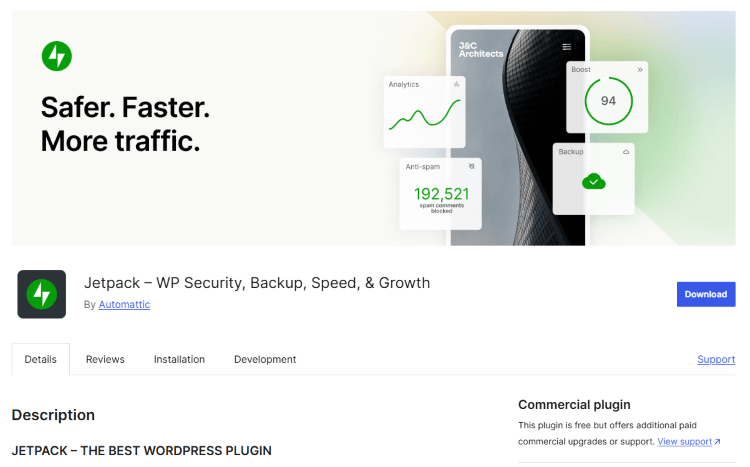
Jetpack is an all-in-one plugin that provides multiple functionalities in a single package. Instead of installing separate plugins for security, performance, backups, and marketing, Jetpack consolidates everything into one powerful tool. This makes it an essential plugin for both beginners and experienced WordPress users.
Jetpack offers features such as:
- Enhanced Security: Protection from malware, brute-force attacks, and spam.
- Performance Boost: Site speed optimization, image and video compression, and lazy loading.
- Backup and Restore: Automated backups with easy restore options.
- SEO and Marketing Tools: Social media integration, site analytics, and content sharing.
Whether you run a personal blog, an eCommerce store, or a corporate website, Jetpack can help streamline your WordPress experience and enhance your site's efficiency.
Key Features of Jetpack
1. Security & Protection
One of the most critical aspects of any website is security. Jetpack offers robust security features, including:
- Real-time malware scanning to protect your site from malicious attacks.
- Brute force attack protection, preventing hackers from accessing your admin panel.
- Automated spam filtering to keep your comment section clean.
- Daily and real-time backups, allowing you to restore your website instantly in case of data loss.
With Jetpack, you don’t need a separate security plugin, as it covers most security threats effectively.
2. Performance Optimization
A slow website can result in higher bounce rates and lower SEO rankings. Jetpack provides several tools to enhance your site speed, such as:
- CDN (Content Delivery Network) to distribute images and static files across multiple servers worldwide, reducing loading times.
- Lazy Loading for images, ensuring they load only when visible on the screen.
- Video Hosting with an ad-free, high-speed service optimized for WordPress.
By implementing Jetpack’s performance features, websites load faster, ensuring better user experience and improved SEO rankings.
3. Site Backups and Restore
Jetpack offers automated backups, which are crucial for website owners. If your site crashes due to an update or cyberattack, Jetpack’s one-click restore function allows you to recover your data instantly.
Some benefits include:
- Daily or real-time backups, depending on your subscription.
- Easy site migration if you move to a new hosting provider.
- One-click restore functionality, making website recovery stress-free.
Having regular backups is essential to maintaining a secure and reliable website.
4. SEO & Marketing Tools
For businesses looking to boost their online visibility, Jetpack offers built-in SEO and marketing features, such as:
- Automated social media sharing to promote content on Facebook, Twitter, and LinkedIn.
- Website analytics with traffic insights, referral sources, and user engagement.
- Related posts feature, keeping visitors engaged with relevant content suggestions.
- Google AMP support, ensuring your site is optimized for mobile users.
By utilizing Jetpack’s SEO and marketing tools, website owners can increase traffic and engagement effectively.
5. Customization & Design Enhancements
Jetpack also provides tools to enhance your website’s design without coding knowledge:
- Custom CSS editor for making styling changes.
- Hundreds of free and premium themes to choose from.
- Infinite scroll and tiled galleries for a better user experience.
- Sidebar widgets and contact forms to improve functionality.
These features make it easier for beginners to create a professional and visually appealing website.
How to Install and Set Up Jetpack
Installing Jetpack on your WordPress website is simple:
Step 1: Install Jetpack
- Log into your WordPress dashboard.
- Navigate to Plugins > Add New.
- Search for Jetpack by Automattic.
- Click Install Now and then Activate.
Step 2: Connect to WordPress.com
- After activation, Jetpack will prompt you to connect with WordPress.com.
- Sign in or create a WordPress.com account.
- Click Approve to grant permissions.
Step 3: Configure Jetpack Features
- Choose the features you want to enable (security, backups, speed optimization, etc.).
- Upgrade to a premium plan if you need advanced features.
Once set up, Jetpack will automatically manage your website’s security, performance, and marketing efforts.
Why Should You Use Jetpack?
Pros of Jetpack
✅ All-in-one solution (security, performance, and marketing).
✅ Automatic backups and security scans.
✅ Boosts site speed with CDN and lazy loading.
✅ SEO-friendly with social media tools and analytics.
✅ Easy to install and configure.
Cons of Jetpack
❌ Some features require a premium subscription.
❌ Can be resource-heavy on certain hosting environments.
Despite these minor drawbacks, Jetpack remains one of the most powerful plugins for WordPress users.
Need Help with Jetpack? Let Our Experts Assist You!
Setting up Jetpack correctly and maximizing its potential can be overwhelming, especially for beginners. That’s why our professional web development agency offers a Jetpack setup and optimization service tailored to your needs!
Our Jetpack Service Includes:
✅ Installation & Configuration – We set up Jetpack and configure it for optimal performance.
✅ Security Optimization – We enable the best security settings to protect your website.
✅ Speed Enhancements – We fine-tune Jetpack’s performance features for fast loading times.
✅ Backup & Restore Setup – We ensure your website is backed up daily for complete safety.
✅ SEO & Marketing Integration – We configure Jetpack’s marketing tools to boost your online presence.
🚀 Ready to supercharge your WordPress website? Contact us today and let our experts handle everything for you!
📩 Get in touch now!
By choosing our service, you ensure that your website is secure, fast, and optimized with Jetpack’s best features. Don’t miss the opportunity to enhance your WordPress experience—let us do the hard work for you!
Jetpack is an essential plugin for anyone serious about security, performance, and SEO on their WordPress site. Whether you are a blogger, business owner, or eCommerce seller, Jetpack can simplify website management and provide powerful enhancements.
And if you need professional help setting up and optimizing Jetpack, our agency is here to assist! Reach out today and take your website to the next level. 🚀
About us and this blog
We are a digital marketing company with a focus on helping our customers achieve great results across several key areas.
Request a free quote
We offer professional SEO services that help websites increase their organic search score drastically in order to compete for the highest rankings even when it comes to highly competitive keywords.
Subscribe to our newsletter!
Unlock Your Growth. Let's Talk Strategy.
Share Your Vision With Us
We craft data-driven digital marketing campaigns that drive traffic, generate leads, and boost your sales. Share your goals with us.
More from our blog
See all postsRecent Posts
- Comprehensive Guide to Shopify Pricing: Everything You Need to Know December 20, 2025
- What is "Salla" Store? A Comprehensive Overview December 20, 2025
- The Cost of Building a Salla Store: A Comprehensive Guide December 20, 2025
