

A Comprehensive Guide to WPForms: The Ultimate WordPress Form Builder
- December 14, 2025
- Other Plugins
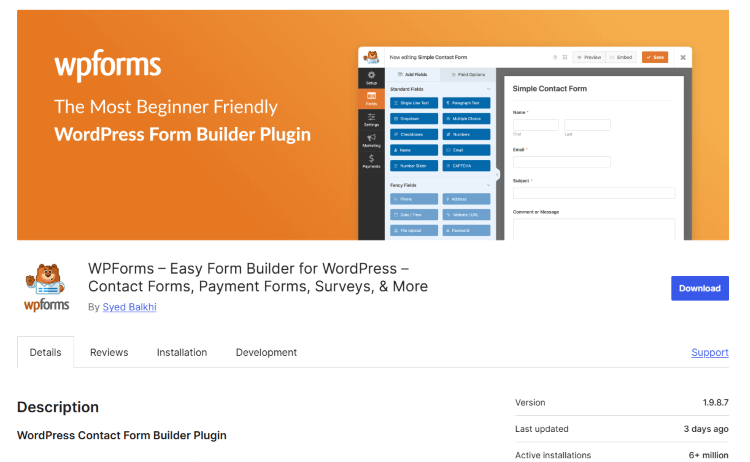
WPForms is one of the most popular and user-friendly form builder plugins for WordPress. It allows website owners to create highly customizable and professional-looking forms without requiring coding skills. Whether you need contact forms, surveys, payment forms, or registration forms, WPForms provides a drag-and-drop interface that simplifies the process.
WPForms is widely used by businesses, bloggers, eCommerce stores, and agencies to enhance user engagement and streamline data collection. It integrates seamlessly with email marketing services, CRMs, and payment gateways, making it a powerful tool for online businesses.
Why Use WPForms?
WPForms stands out as a leading form builder plugin due to its ease of use, extensive features, and flexibility. Below are some of the key reasons why it is a must-have plugin for WordPress users:
1. User-Friendly Drag-and-Drop Interface
One of the main reasons WPForms is popular is its intuitive drag-and-drop form builder. Unlike traditional form-building methods that require HTML and CSS knowledge, WPForms makes it incredibly easy to create professional forms with just a few clicks.
- No coding required
- Instant preview of forms
- Easy customization with pre-built templates
2. Pre-Built Form Templates
WPForms offers a collection of pre-built form templates that save time and effort. Instead of designing a form from scratch, you can simply select a template that suits your needs and customize it accordingly.
Some of the common templates include:
- Contact forms
- Registration forms
- Newsletter signup forms
- Feedback forms
- Survey and poll forms
- Donation forms
3. Mobile-Friendly and Responsive Design
With mobile internet usage surpassing desktop usage, it is crucial that your website’s forms are mobile-friendly. WPForms ensures that all forms created using the plugin are fully responsive and optimized for all screen sizes.
4. Smart Conditional Logic
WPForms includes an advanced feature known as Conditional Logic, which allows users to create dynamic forms that change based on user responses. This feature is particularly useful for:
- Showing or hiding specific fields based on user input
- Creating multi-step forms with different options
- Personalizing the user experience
5. Seamless Integration with Third-Party Services
WPForms integrates seamlessly with various third-party services, including:
- Email Marketing Services: Mailchimp, AWeber, ConvertKit, Drip, etc.
- Payment Gateways: PayPal, Stripe, Square
- CRM Platforms: HubSpot, Salesforce, Zoho CRM
- Cloud Storage: Google Drive, Dropbox
6. Spam Protection and Security
Spam submissions can be a major issue for website owners. WPForms provides built-in spam protection through:
- Google reCAPTCHA
- hCaptcha
- Custom CAPTCHA fields
- Honeypot protection
This ensures that only genuine users submit forms, keeping your database free from unwanted spam entries.
7. Multi-Step Forms for Better User Experience
Long forms can be overwhelming for users. WPForms offers a Multi-Step Form feature, breaking down lengthy forms into smaller sections. This increases form completion rates and improves user engagement.
8. Payment and Donation Forms
WPForms supports secure online payments and donations through integrations with PayPal, Stripe, and Square. This makes it ideal for businesses and non-profits that need to collect payments directly from their website.
9. Surveys and Polls
For businesses and content creators who want to gather user feedback, WPForms provides a Surveys and Polls addon. This feature includes:
- Interactive survey forms
- Real-time poll results
- Graphical reports for better insights
10. User Registration and Login Forms
WPForms can be used to create custom registration and login forms, making it a great alternative to the default WordPress login page. This is particularly useful for membership websites, forums, and online communities.
How to Install and Set Up WPForms
Setting up WPForms is quick and straightforward. Here’s a step-by-step guide:
Step 1: Install WPForms
- Log in to your WordPress dashboard.
- Go to Plugins > Add New.
- Search for "WPForms."
- Click Install Now, then Activate.
Step 2: Create a New Form
- Navigate to WPForms > Add New.
- Choose a template or start from scratch.
- Use the drag-and-drop builder to customize your form.
- Configure settings such as notifications, confirmations, and integrations.
Step 3: Embed the Form on Your Website
Once you have created your form, you can easily embed it in posts, pages, or widgets.
- Copy the form’s shortcode.
- Paste it into any post, page, or sidebar widget.
- Save and publish your changes.
Your form is now live and ready to accept submissions!
Best Use Cases for WPForms
WPForms can be used in a variety of scenarios across different industries. Here are some of the best use cases:
1. Business Websites
- Contact forms for customer inquiries
- Quote request forms for service businesses
- Feedback forms for customer satisfaction
2. eCommerce Stores
- Order forms for custom products
- Payment and donation forms
- Refund request forms
3. Bloggers and Content Creators
- Newsletter signup forms
- Polls and surveys for audience feedback
- Collaboration request forms
4. Educational Institutions
- Student registration forms
- Event registration forms
- Online quiz and assessment forms
5. Non-Profit Organizations
- Donation collection forms
- Volunteer signup forms
- Event RSVP forms
Conclusion
WPForms is an essential plugin for any WordPress website looking to enhance user engagement and streamline data collection. With its intuitive drag-and-drop builder, extensive integrations, and advanced features like conditional logic, spam protection, and payment processing, WPForms is one of the best form builder plugins available today.
Whether you’re running a small blog, an online store, or a large business website, WPForms provides all the tools you need to create professional and efficient forms. By using WPForms, you can improve user experience, boost conversions, and automate workflows, ultimately growing your online presence with ease.
About us and this blog
We are a digital marketing company with a focus on helping our customers achieve great results across several key areas.
Request a free quote
We offer professional SEO services that help websites increase their organic search score drastically in order to compete for the highest rankings even when it comes to highly competitive keywords.
Subscribe to our newsletter!
Unlock Your Growth. Let's Talk Strategy.
Share Your Vision With Us
We craft data-driven digital marketing campaigns that drive traffic, generate leads, and boost your sales. Share your goals with us.
More from our blog
See all postsRecent Posts
- Comprehensive Guide to Shopify Pricing: Everything You Need to Know December 20, 2025
- What is "Salla" Store? A Comprehensive Overview December 20, 2025
- The Cost of Building a Salla Store: A Comprehensive Guide December 20, 2025
