

Maximize Website Performance with AssetCleanup: A Comprehensive Guide
- December 15, 2025
- Speed Plugins
In today’s fast-paced digital world, website performance is crucial. Slow-loading websites frustrate visitors, hurt user experience, and lead to a loss of potential customers. To ensure that your site delivers the best possible performance, optimizing your assets—scripts, stylesheets, and other resources—becomes essential. One highly effective tool for achieving this goal is Asset Cleanup, a WordPress plugin designed to help you clean up and optimize your site’s assets.
This article will explore the features, benefits, and functionalities of Asset Cleanup, and how using this plugin can enhance your website’s speed, user experience, and SEO performance. We’ll also dive into how you can implement it efficiently and discuss additional support services offered by our agency to help you take your site’s performance to the next level.
What is AssetCleanup?
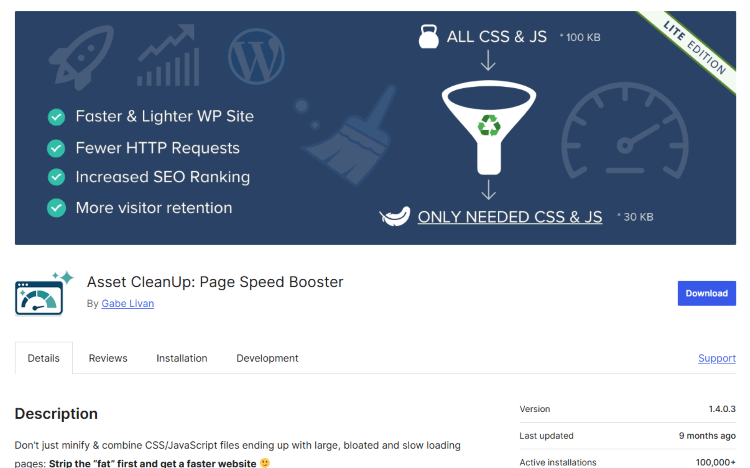
Asset Cleanup is a lightweight yet powerful WordPress plugin designed to optimize website performance by reducing unnecessary code bloat. WordPress themes and plugins often load a variety of resources, including JavaScript and CSS files, that may not be needed on all pages. This extra code can significantly slow down your site’s load time. Asset Cleanup helps you streamline these assets, improving performance and reducing page load times.
The plugin works by allowing you to selectively disable unnecessary scripts and styles on a per-page or per-post basis. This means you only load the essential assets for each page, cutting down on excess code and improving the overall efficiency of your website.
Why is Asset Cleanup Important for Your Website?
1. Faster Load Times:
One of the most significant advantages of using Asset Cleanup is improved load times. By eliminating unused CSS and JavaScript files, your pages will load faster. Faster load times reduce bounce rates, improve user experience, and contribute to better search engine rankings.
2. Improved User Experience:
Slow websites lead to frustrated users who are likely to leave your site before it even finishes loading. A faster, cleaner site enhances user experience, which can improve engagement, increase conversion rates, and lead to higher customer satisfaction.
3. Better SEO Performance:
Google’s ranking algorithm heavily favors fast-loading websites. Asset Cleanup can significantly improve your page’s load speed, positively influencing your SEO performance. Websites with better load speeds tend to rank higher in search results, driving more organic traffic to your site.
4. Reduced Server Load:
When your website loads fewer resources, it puts less strain on your web server. This can be especially helpful if you’re hosting on shared servers, where resources are limited. Reducing the number of assets also frees up bandwidth and reduces the risk of timeouts or crashes.
Key Features of AssetCleanup
1. Selective Asset Management:
Asset Cleanup gives you full control over what scripts and styles are loaded on individual pages, posts, or even custom post types. This fine-tuned control allows you to ensure that only the necessary assets are loaded, minimizing bloat.
2. Minimize HTTP Requests:
By disabling unneeded scripts and styles, you can reduce the number of HTTP requests your website makes. Fewer requests lead to faster load times, which is particularly beneficial for websites that contain heavy media or numerous plugins.
3. Defer Non-Critical JavaScript:
The plugin allows you to defer the loading of JavaScript files that are not needed immediately, enabling the critical content to load faster. This is an essential feature for improving page speed metrics such as Time to First Byte (TTFB) and Largest Contentful Paint (LCP).
4. Combine CSS and JavaScript Files:
Asset Cleanup allows you to combine CSS and JavaScript files into fewer files, which reduces the number of server requests and improves load times. Combining assets is a simple yet effective optimization technique.
5. Conditional Asset Management:
The plugin enables you to disable or load specific assets based on certain conditions. For example, you can load a particular JavaScript library only on certain pages where it’s needed, rather than globally across the entire site.
6. Bulk Disable/Enable:
If you want to disable certain assets across the entire website or for specific pages, Asset Cleanup offers bulk actions. This saves you time and allows you to quickly optimize multiple assets with just a few clicks.
7. Detailed Debug Information:
The plugin provides a debug mode that shows all the resources loaded on a page. This helps you identify exactly what scripts or styles are being loaded, so you can make informed decisions on what to disable.
How to Use AssetCleanup Effectively
- Install and Activate the Plugin: First, you need to install the Asset Cleanup plugin. You can download it from the WordPress Plugin Repository and activate it via the WordPress admin dashboard.
- Configure Global Settings: Once installed, you can configure global settings for your website. This includes enabling or disabling specific types of assets, such as CSS or JavaScript files. You can also set up whether you want to optimize assets on all pages or only on selected pages.
- Analyze Your Site’s Assets: After activation, Asset Cleanup scans your website for all active scripts and styles. It will provide a detailed list of the assets being loaded on each page. You can access this list from the plugin’s interface and start reviewing the assets.
- Disable Unnecessary Assets: Based on your analysis, you can disable assets that are not needed on specific pages or posts. For example, a contact page may not need the same set of scripts as a blog post or product page. Asset Cleanup enables you to make these distinctions and disable unnecessary resources.
- Test Your Site’s Performance: After making changes, test your website’s performance using tools like Google PageSpeed Insights, GTmetrix, or Pingdom. You should notice a significant improvement in load times and overall performance.
- Ongoing Optimization: As you add new plugins or content to your site, remember to periodically review your assets and make sure you're not loading unnecessary files. Asset Cleanup makes it easy to maintain an optimized website over time.
Common Challenges and How to Overcome Them
- Breaking Website Features: Disabling certain scripts or styles can sometimes break website features. It’s essential to test your site thoroughly after making changes to ensure everything functions as expected. If you're unsure, make use of the debug tools and check for any errors on the page.
- Compatibility with Other Plugins: Some plugins may conflict with Asset Cleanup. If you notice issues after optimization, check for conflicts between plugins and consider seeking assistance from experts who can help resolve them.
- Advanced Configuration: For websites with more complex needs, the plugin offers advanced settings. However, these may require a deeper understanding of how JavaScript and CSS files work. If you’re unsure, it may be beneficial to get expert help.
Why Choose Our Agency for Asset Optimization?
Optimizing your website’s performance goes beyond simply installing a plugin. It requires expertise, careful planning, and continuous monitoring to ensure that your website remains fast, secure, and scalable. At Nafas Digital, we specialize in website optimization and can help you get the most out of tools like Asset Cleanup.
Here’s how our agency can assist you:
- Customized Asset Optimization: We analyze your website and tailor the optimization process based on your specific needs, ensuring your site only loads the essential assets.
- Ongoing Performance Monitoring: Our team will continuously monitor your site’s performance, making adjustments as needed to keep your website running smoothly.
- Expert Troubleshooting: If you encounter any issues or conflicts during the optimization process, our experienced developers will quickly resolve them, ensuring no downtime or broken features.
- Comprehensive Website Audits: We conduct thorough audits of your site’s performance, identifying all areas where improvements can be made—from asset cleanup to database optimization and server configuration.
- Advanced SEO Integration: We’ll integrate your performance improvements with SEO best practices, ensuring that your fast-loading site also ranks higher in search engines.
If you’re ready to boost your website’s speed and performance, Nafas Digital is here to help. Contact us today for a free consultation and let us show you how Asset Cleanup and other advanced techniques can transform your site.
About us and this blog
We are a digital marketing company with a focus on helping our customers achieve great results across several key areas.
Request a free quote
We offer professional SEO services that help websites increase their organic search score drastically in order to compete for the highest rankings even when it comes to highly competitive keywords.
Subscribe to our newsletter!
Unlock Your Growth. Let's Talk Strategy.
Share Your Vision With Us
We craft data-driven digital marketing campaigns that drive traffic, generate leads, and boost your sales. Share your goals with us.
More from our blog
See all postsRecent Posts
- Comprehensive Guide to Shopify Pricing: Everything You Need to Know December 20, 2025
- What is "Salla" Store? A Comprehensive Overview December 20, 2025
- The Cost of Building a Salla Store: A Comprehensive Guide December 20, 2025
